Tag: apple

In its search for new markets and revenue, Google seems to be taking a bite out of Apple.

For months the two companies have competed in the mobile-phone market thanks to Google’s Android operating system, and that competition is fiercer now that Google has stamped its logo on the back of the Nexus One (designed by Google and manufactured by HTC). Despite some differences, the new Google smartphone looks a lot like an iPhone.

There’s competition on other fronts as well, including the operating system business.

In its initial blog post in July, Google positioned Chrome OS as “an open source, lightweight operating system that will initially be targeted at netbooks.” That alone could harm Apple if Chrome-powered netbooks take sales away from Mac laptops. But now there’s talk about both Chrome and Android being used on tablet devices that could compete with Apple’s just announced iPad.

Concept of what a Google tablet might look like (source: Google)

There have been no product announcements, but Google’s Chrome Web site is displaying “visual explorations of how a Chrome OS tablet UI (user interface) might look in hardware.” The illustrations provide only a vague idea of what such a tablet might be like, but their very existence indicates that Google may be eyeing the market that Apple hopes to bust open.

Just in case one tablet operating system isn’t enough of a threat to Apple, Google is potentially going after the iPad with two operating systems at once. Android, in addition to Chrome, could also be used to create a potential iPad killer.

At last month’s Consumer Electronics Show, MSI displayed a 10-inch tablet running Google’s Android operating system.

It’s important to emphasize that neither the Google concept drawings nor the MSI prototype represents a real product. But what they do represent is the possibility, and perhaps the intention, of Google to quickly enter the tablet marketplace.

To be sure, there are important differences between Apple and Google. Apple is more focused and disciplined — it works long and hard on a very small number of products and keeps quiet about them until they’re almost ready for prime time. Then, with great fanfare, Steve Jobs announces them to the world and puts them on sale shortly thereafter.

Google throws lots of things against the wall to see what sticks. The company’s experimental culture is so strong that employees are allowed to devote 20 percent of their time to any project that strikes their fancy, some of which actually see the light of day as products or services.

Apple’s formula — at least with the iPhone — worked like a charm. The hype was followed by a product that delighted most early reviewers and customers. And although I questioned in last week’s column whether the iPad can live up to its hype, I acknowledge that it is an innovative product that might do well when it hits the market.

Google’s approach is usually to pre-announce months in advance and rely on partners like HTC (and now Motorola) to build devices around its open source software. Unlike the first iPhone, the initial Android phone — the HTC G1 — got tepid reviews. But with the release of the Motorola Droid and Google’s Nexus One, Android is starting to win fans and respect.

Google’s initial foray into the browser market was also a bit disappointing but that, too, is starting to change. When the Chrome browser came out, it was a bit faster than market leaders Internet Explorer and Firefox but not nearly as versatile because it lacked support for extensions that allow third parties to add functionality. However, Google recently released a beta version of Chrome that fixes that problem.

Last month Chrome overtook Apple’s Safari as the third-place browser behind Internet Explorer and Firefox, according to Net Applications. As more extensions become available and more people download the newer version, I’m confident its market share will continue to grow.

The biggest difference between Apple and Google has to do with control. Apps for both the iPhone and iPad will be distributed through Apple and be vetted and approved by Apple before being made available to users. Google has a more open approach, allowing anyone to create an app for their phone or their computer operating system.

The democrat (small d) in me sides with Google. But the part of me that’s concerned about safety and security understands the advantages of having a company like Apple examine the applications for its devices.

Mostly I’m just glad to see these two talented and resourceful companies compete with each other and, of course, Microsoft, which was once thought to be a monopoly but is now struggling to compete with both Google and Apple.

This post is adapted from a column by Larry Magid that appeared in the San Jose Mercury News

Tags: , , , ,

By Larry Magid

I picked up my iPhone 3G S at the Palo Alto store early on launch day, Friday morning, and after several hours of testing, I’m impressed so far.  Not only did I find it a lot faster than the 3G for loading applications, I also quickly came to appreciate its new video capabilities and its voice control.

The new phone looks virtually identical to its predecessor. And, since Apple just issued a free update of the iPhone operating system for previous iPhones, many of the new features are also available on first and second generation iPhones and even the iPod Touch (iPod Touch users will have to pay $10 for the software).  But there are some things you only get with the new hardware.

For example, with the 3G S and the older 3G side by side, I launched several applications. AOL Radio, Facebook and Safari all loaded about twice as fast on the 3G S.  There is technology in the new phone that will use AT&T’s faster HSPA 7.2 megabit data network but that network isn’t yet available. Nevertheless, I still found web surfing in Safari to be noticeably faster on the new phone compared to the 3G connected to the same WiFi or cellular network, presumably because of the new phone’s faster processor.

You can talk to it

I wasn’t sure I’d like it, but I’m falling in love with the Voice Control feature in the new phone.  To call someone in your contact list you simply hold down the home button and say “Call Dave Smith” (or whomever).  If Dave has multiple phone numbers a voice will ask you if you wish to call home, office, mobile, etc.  You can also use this to dial a number by simply saying “Dial 555-1212” and it will dial for you.  Without even having to click the iPod icon, the feature can also be used to “play songs by” play “next” or “previous” song, turn on shuffle  or play  particular playlist.  When in the main screen I said “shuffle” and the phone told me that “no music is playing, do you want to play music now.” When I said “yes” the music started. Available commands are displayed on the screen when you’re using Voice Control.

Improved Camera

One of the most heralded new features is the improved camera. It’s been upgraded to 3 megapixels and now has autofocus.  If you touch the screen a rectangle shows the focus area.  Most important – the 3G S can now take video which you can easily email or upload to YouTube.  The video is standard definition — not high def – but you can shoot either in portrait or widescreen landscape mode.  Once you’ve completed your shoot, you can trim the beginning and the ending. That’s not exactly sophisticated video editing but it’s very useful.  You can then send the video as an email or upload it directly to your YouTube account.

My first video won’t win any academy awards but you can see the 43 second clip I shot from the Apple store below.  Unfortunately, I shot this before learning that you can get better results holding the phone in landscape mode.  If you scroll down you’ll see my second video which was in landscape mode.

A sense of direction

At first I wondered why anyone other than a hiker would care about the iPhone’s new compass until I tried pressing the compass button within Google maps and noticed that it orients you based on the direction you’re moving. I’m sure other application developers will also find a way to use this feature.

What all current iPhone users get with iPhone OS 3

As I said earlier, some of the features on the new phone are also available on older iPhones with the free OS 3 upgrade.  These include (finally) the ability to copy, cut and paste, a wider landscape keyboard in mail, messages, notes and Satari and the ability to search across the phone for contacts, mail, calendars, notes and iPod content.  There is a also a nifty new Voice Memo application that – like the video app — lets you trim the beginning and ending of your audio.  Although it’s not positioned as a professional tool, I found the quality good enough to use for radio clips.

Worthwhile upgrade?

Clearly the iPhone 3G S is a worthwhile upgrade but, if you’re already an iPhone user, it’s hard to say whether the extra speed and new features are worth the extra price, especially if you’re in the middle of your AT&T contract and have to pay a premium over the standard $199 for the 16 GB model or $299 for the 32 GB version.  And, now that the older 8 GB  iPhone 3G has been reduced to $99, some people might want to buy that inflation friendly model which has many of the same features at a more affordable price.   Still, compared to the competition – including Palm’s new Pre – the iPhone 3 GS is a good value and a very innovative product.

And here’s the second video I shot with the iPhone 3G S. It’s an interview with Shervin Pishevar of SGN who developed a new online piloting game for the new iPhone operating system.

This post was adapted from an article that appaered on InternetNews.com

Tags: , ,

The smart phone wars have heated up over the past few days with the release of Palm’s new Pre and Apple’s announcements of a new iPhone, a cheaper price for its existing phone and a new operating system for users of all iPhones.

The Palm Pre, which hit stores on Saturday for $199 after rebate (and a two year contract with Sprint) is a very worthy competitor for Apple. Unlike the iPhone it has a physical keyboard which, while a bit small, is quite good. But it also has a touch screen that you can use to launch programs, zoom, shrink or move windows and dial the phone, although there’s no onscreen virtual keyboard for entering text.

One of the things I like best about the Pre is that you can synchronize it over the air. Rather than connect it to a PC or Mac to move over contacts and calendar items, you simply sign in to your existing accounts and it brings over all the data via the Sprint network. It works with Google’s calendar and Gmail, Yahoo and other web-based services as well as for businesses with Microsoft Exchange servers. Apple does this through its $99 a year MobileMe service but Palm does it for free with a variety of services.

Like the iPhone the Pre has a media player for video and music and it does come with a cable to move music and video files from a PC or Mac. But rather than write their own synchronization software, Palm encourages users to synch their media files with Apple’s free iTunes software. When a Pre is connected, iTunes thinks it’s an iPod or iPhone. I’m not sure what Apple’s legal department will have to say about that, but if Palm can get away with it, it makes life easier all around.

I also like the way Palm organizes windows. The device’s Web OS operating system is multi-tasking so you can run several programs at once but to make the most out of the Pre’s small screen, each program runs in a “card” and all the cards become visible when you press the Pre’s physical button below the screen. You then use your finger to flick from card to card and just touch the card you want to make full screen. To close a program you simply flick the card up and away.

You can dial the phone by punching numbers on the onscreen keyboard or typing them from the physical keyboard but you’re more likely to just start typing the name of the person you want to call so the phone can look up and dial the number for you. That’s also the case with the Blackberry, iPhone and most other smart phones.

I like the Pre a lot but I do have a few complaints. It’s a little sluggish – not terrible, but enough so I notice slight delays. And while it’s relatively user-friendly, it’s not as friendly as the iPhone. I find myself having to think about what to do and occasionally having to type “help” to bring up the cheat sheet, whereas with the iPhone I don’t recall having hardly any learning curve other than getting used to the iPhone’s virtual keyboard. Except for typing on the screen (which I’m still not 100% comfortable doing), it just seemed to be obvious right out of the box.

There are some things I like better about the Pre than the iPhone and the opposite is also true so, on balance, if you had to buy a smart phone today, I think the Pre and the iPhone are pretty much neck and neck. But wait – Apple isn’t sitting still. Not only did the company on Monday announce a new iPhone, it also announced free software that will upgrade existing models.

The iPhone 3G S (which I haven’t yet tested) is said to be faster than the existing 3G, have much better battery life and come with a 3 megapixel camera that can also record video. It will come with twice the memory for the same price: $199 for 16 GB and $299 for 32 GB, up from 8 and 16. The Palm Pre comes with jut 8 GB. Also, Apple reduced the starting price of its existing 3G phone to $99.

Apple says that the phone will load applications faster and take advantage of upcoming planned speed improvements in AT&T’s 3G network. Apple also says that the new phone will have better battery life including up to 5 hours of 3G talk time or 12 hours if you’re on the 2G network. The new phone’s 3 megapixel camera will also have autofocus and an automatic macro mode for close-ups. The big news is that it will record video with software that will let you easily send or post the video. Though lacking in the Pre, video is pretty common on phones but the new iPhone lets you edit video from the phone which is very cool.

Catching up with the Pre (and most other smart phones), Apple’s new operating system, which comes out on June 17th, will upgrade all iPhones with cut, copy and paste features.

Simply based on memory configuration, the iPhone hardware is now less expensive than the Pre, but it might cost you more to use it. Sprint has some pretty aggressive pricing, including a $99 “Simply Everything” plan that covers unlimited voice, data and texting. AT&T bas a $99 “Nation Unlimited” plan for voice but you must also pay $30 for the data plan plus an optional $20 for unlimited text messages. Before buying a phone, check out the carriers plans to see what makes sense for your usage patterns.

Unlike the Pre, Blackberry and most other phones, the iPhone doesn’t have a removable battery which is a problem for existing phones that sometimes run out of juice during a single day. If Apple delivers on its promise of better battery life that will be less of an issue but I still like being able to carry extra batteries just in case.

The new iPhone will be available June 19. Expect long lines at Apple and AT&T stores. The Palm Pre is available now. There aren’t long lines at Sprint stores, Best Buy or other retailers, but there are shortages.

Tags: , , ,

My original review from the Jan 29, 1984 Los Angeles Times

My original review from the Jan 29, 1984 Los Angeles Times

by Larry Magid
As published on January 29, 1984 in the Los Angeles Times

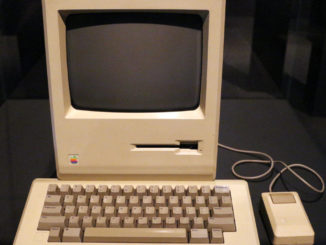
I rarely get excited over a new computer. But Apple’s Macintosh, officially introduced last Tuesday, has started a fever in Silicon Valley that’s hard not to catch. My symptoms started when I talked with some devotees from Apple and the various companies that produce software, hardware and literature to enhance the new computer. By the time I got my hands on the little computer and its omni-present mouse, I was hooked. Apple has a winner.

The Mac, which retails for $2,495 is about 14 inches tall and takes up about the same amount of desk space as a piece of 8 1/2 x 11 paper. It is smaller and lighter than most of the so called “portable” machines. The entire system can be slipped into an optional ($99) padded carrying case to be hoisted over your shoulder or placed under an airline seat. The case and computer together weigh 22 pounds.

Of course any computer’s real value is based on what you can do with it. For the first 100 days, Apple is including two valuable programs, MacPaint and MacWrite free with the machine. MacWrite has most basic word processing features with one outstanding addition. It can vary the size and style of your type on the screen and on paper, when used with Apple’s new $495 Image Writer printer. This computer/printer/software combination produces the first truly “what you see is what you get” word processing system on a moderately priced microcomputer. You can vary the type size from 9 point (about the size used in most newspapers) to 72 point headlines. You can also change your type style, selecting an Old English font or one of the more common type styles. Your type can be in bold, italic, underline or even shadow print. All this magic is controlled by the computer itself — the software merely takes advantage of it. › Continue reading…

Tags: , , , ,
Back to top
